Showing posts with label technews. Show all posts
Saturday, 6 February 2016
Make Any Laptop Touchscreen with Airbar
The Airbar will turn any Windows laptop into a
touch screen. Very cool. The technology is friendly with Windows 8 and
10 and this is because it uses Microsoft’s “Gestures” technology to turn
your laptop into a touchscreen laptop.
The Airbar was designed in Sweden and made in Sweden. The bar is $50 US Dollars.

The Airbar works by invisible light beams. To get it working you
connect is via USB and set the bar at the bottom of your laptop screen,
just like you see in the picture.
The Airbar will project light upward. As your fingers break the barrier of the projected light, the bar will translate this into gestures. Through the Windows API for gestures your actions will translate to the programs running.

This is certainly an economical way of transforming your laptop into a touch screen.
You can swipe, touch, point and pinch to interact with your PC. If
the Airbar is projecting light upward, I can understand how pinching
horizontally will interact, but I don’t understand how pinching
vertically will interact. It seems the bottom finger would block the top
finger during the pinch movement. I say this because the light is
projected vertically upward, bottom to top.
GetUSB.info has emailed the company asking for further explication.

Source: air.bar
Monday, 1 February 2016
How can startup CEOs do better than everyone else

"Whenever
you find a really great CEO, you find someone who has a knack for
hiring. That means selling other people on your dream or your business,
especially when it doesn't seem all that important or seems very risky. I
used to work for a CEO who was awesome at hiring, but couldn't fire
anyone. Doomed the business. Many of the best CEOs get others to follow
no matter what."
— Robert Scoble, futurist at Rackspace
— Robert Scoble, futurist at Rackspace

"Getting out and understanding customers is far more important than book smarts or computer research."
— Mark Suster, partner at Upfront Ventures
— Mark Suster, partner at Upfront Ventures

"Most
entrepreneurs have a healthy dose of self-interest. However, serially
successful startup leaders place their stakeholders' well being before
their own personal gain. Situations inevitably arise in which key
executives could covertly self-deal and enhance their financial outcomes
at the expense of their fellow employees and investors. Consistent
winners resist this temptation."
— John Greathouse, entrepreneur, investor and professor
— John Greathouse, entrepreneur, investor and professor

"[Zappos
CEO Tony Hsieh] has conviction in his ideas. From the big examples of
offering people money to quit the company after training (and doubling
down again offering people severance if they didn't adopt his new
management system called Holocracy), to smaller examples of his choice
to live in a trailer park next to the office with a pet Alpaca, despite
selling Unicorn to Amazon, shows he will pursue his true beliefs and not
let others get in the way of his vision."
— Daniel Rodic, co-founder of Exact Media
— Daniel Rodic, co-founder of Exact Media

"A
CEO has to be detail-oriented, but not micro-manage (there is a
difference). Building a company is all about making all the pieces fit
together so the machine can deliver predictable results at scale."
— Henning Moe, sales guy and entrepreneur
— Henning Moe, sales guy and entrepreneur

"Interestingly
no one has said courage. You must have courage to even take the plunge.
Thereafter, you need the courage to follow your own path when everyone
around you says you're crazy, wrong, or inexperienced. You need the
courage to do what you think is right regardless of conventional wisdom.
And finally, you need the courage to stand out, to be extraordinary, to
make enemies (if need be), to say 'no' when everyone else would have
said 'yes', and to be confident enough to be yourself."
— Tolis Dimopoulos, startup attorney, Sophos Law Firm
— Tolis Dimopoulos, startup attorney, Sophos Law Firm

"Legendary
startup CEOs understand the game they are playing. They know that less
than 1% of technology startups are ever worth $1 billion. They are not
delusional about the fact that our industry produces a small number of
legendary successes, handfuls of also-rans, and buckets of road kill."
— Christopher Lochhead, co-founding partner
— Christopher Lochhead, co-founding partner

"Founders
are great because they can do so much. Unlimited energy, passion and
time. But once the company gets to a stage where they have to delegate,
many founders fail because they want to control. I call it the rule of
tens. If you manage 0-10 people you can be on top of everything. If you
manage 100 people (through your direct reports), then you have to
delegate responsibility. Your direct reports often ask you for advice,
but then act. If you manage (through your direct reports) 1000 people,
then people will tell you what they did — after they did it. It takes a
different skill set for each factor of ten employees."
— John Backus, venture capitalist & former entrepreneur
— John Backus, venture capitalist & former entrepreneur

"You
can't start your business if you can't sell your product or service. So
if it's not in your nature to convince someone to come around to your
way of thinking, you're not ever going to get your business off the
ground."
— Gerard Danford, academic PhD
— Gerard Danford, academic PhD

"They know not only how to sell their idea and vision, but also how to charge people with energy and drive to pursue them."
— Yulichka YD
— Yulichka YD

"I
think that the ability to embrace, explore and allow creative tension
is something that separates the top 10%. I've seen many CEOs who try to
avoid conflict or aim for consensus most of the time, and this can
stifle creativity. Of course, this is just one attribute to accompany
all the other great ones listed here."
— Alice Chan, PR consultant
— Alice Chan, PR consultant

"Luck.
Anyone who could be classified as being in the top 10% who doesn't own
up to having plenty of luck on their way there is kidding themselves."
— Chris Puttick, co-founder of Two Ten
— Chris Puttick, co-founder of Two Ten

"You
need to keep learning every day. The faster you can tighten up your
feedback loops and make your organization a learning organization that
can adapt and implement based upon things out in the marketplace the
better off you will be."
— Joseph Puopolo
— Joseph Puopolo
Tuesday, 22 September 2015
Indian IT companies among world's worst paymasters

According
to MyHiringClub.com's Worldwide IT Salary 2015 survey, India is ranked
7th on the list of lowest paymasters for IT managers.
NEW
DELHI: Indian IT companies are among the 10 worst paymasters in the
world, says a survey -- a mid-level IT manager draws an average salary
of $41,213 while his Swiss counterpart gets over four times more.
According to recruitment platform MyHiringClub.com's Worldwide IT Salary 2015 survey, India was ranked 7th on the list of lowest paymasters for information technology (IT) managers, down by one position from last year's.
While Indian IT managers drew an average salary of $41,213, Bulgaria topped the list with a meagre $25,680, followed by Vietnam and Thailand averaging at $30,938 and $34,423, respectively.
"The impact of outsourcing and off-shoring on IT roles in North America and Western Europe helps explain the pattern of global pay," MyHiringClub.com & FlikJobs.com CEO Rajesh Kumar said.
The list includes Indonesia at the fourth spot with average wages of $34,780, followed by the Philippines ($37,534), India ($41,213), China ($42,689), Czech Republic ($43,219), and Argentina ($51,380).
"Lower-level roles are being moved to regions where talent is cheaper. The jobs that remain in Western Europe and the United States may be fewer in number, but are more demanding and complex. However, there is an increasing evidence of India's growing stature and presence in the high-end value chain, where cost advantages may not be the only drivers of future growth," Kumar added.
At the other end of the spectrum, when it comes to countries that pay out the best IT salaries, Switzerland again topped the list with an average annual remuneration of $1,71,465. The same job if taken in Belgium, second on the list, would fetch $1,52,430, the survey said.
According to recruitment platform MyHiringClub.com's Worldwide IT Salary 2015 survey, India was ranked 7th on the list of lowest paymasters for information technology (IT) managers, down by one position from last year's.
While Indian IT managers drew an average salary of $41,213, Bulgaria topped the list with a meagre $25,680, followed by Vietnam and Thailand averaging at $30,938 and $34,423, respectively.
"The impact of outsourcing and off-shoring on IT roles in North America and Western Europe helps explain the pattern of global pay," MyHiringClub.com & FlikJobs.com CEO Rajesh Kumar said.
The list includes Indonesia at the fourth spot with average wages of $34,780, followed by the Philippines ($37,534), India ($41,213), China ($42,689), Czech Republic ($43,219), and Argentina ($51,380).
"Lower-level roles are being moved to regions where talent is cheaper. The jobs that remain in Western Europe and the United States may be fewer in number, but are more demanding and complex. However, there is an increasing evidence of India's growing stature and presence in the high-end value chain, where cost advantages may not be the only drivers of future growth," Kumar added.
At the other end of the spectrum, when it comes to countries that pay out the best IT salaries, Switzerland again topped the list with an average annual remuneration of $1,71,465. The same job if taken in Belgium, second on the list, would fetch $1,52,430, the survey said.
Friday, 10 July 2015
BUILD YOUR OWN GAMING PC UNDER 60,000

PC Configuration :-

Price: Rs. 10,690 (approx) Cores: 4
Threads: 4
Base Frequency: 3.1GHz
Turbo Frequency: 3.3GHz
Socket: LGA 1150
Data Width: 64-bit
L3 cache: 6MB
2>Motherboard ASUS B85M-G
Price: Rs. 5,989 (approx)
LGA1150 motherboard
Support for DDR3 4 x DIMM, Max. 32GB, DDR3 1600/1333/1066 MHz RAM
2 x PCIe 2.0
6 native SATA3 ports
4 USB 3.0 ports
Support for DDR3 4 x DIMM, Max. 32GB, DDR3 1600/1333/1066 MHz RAM
2 x PCIe 2.0
6 native SATA3 ports
4 USB 3.0 ports
3>RAM Gskill RipjawsX F3-12800CL9D-8GBXL (2 x 4GB)
Price: Rs. 5,950 (approx)
Memory type: (2 x 4GB) DDR3 1600MHz
Timing: 9-9-9-24-2N
4>HDD Seagate Barracuda 1TB
Price: Rs. 3,550 (approx)
RPM: 7200 Interface: 6GB/s
Cache: 64MB
Operating temperature: 60 degrees celsius
5>Monitor Dell S2240L
Price: Rs. 8,381 (approx)
Screen size: 21.5-inch Max
resolution: 1920 x 1080p
Brightness: 250 nits
Contrast Ratio: 1,000:1
Panel type: LCD
6>Graphics Card ZOTAC GTX 660 2 GB
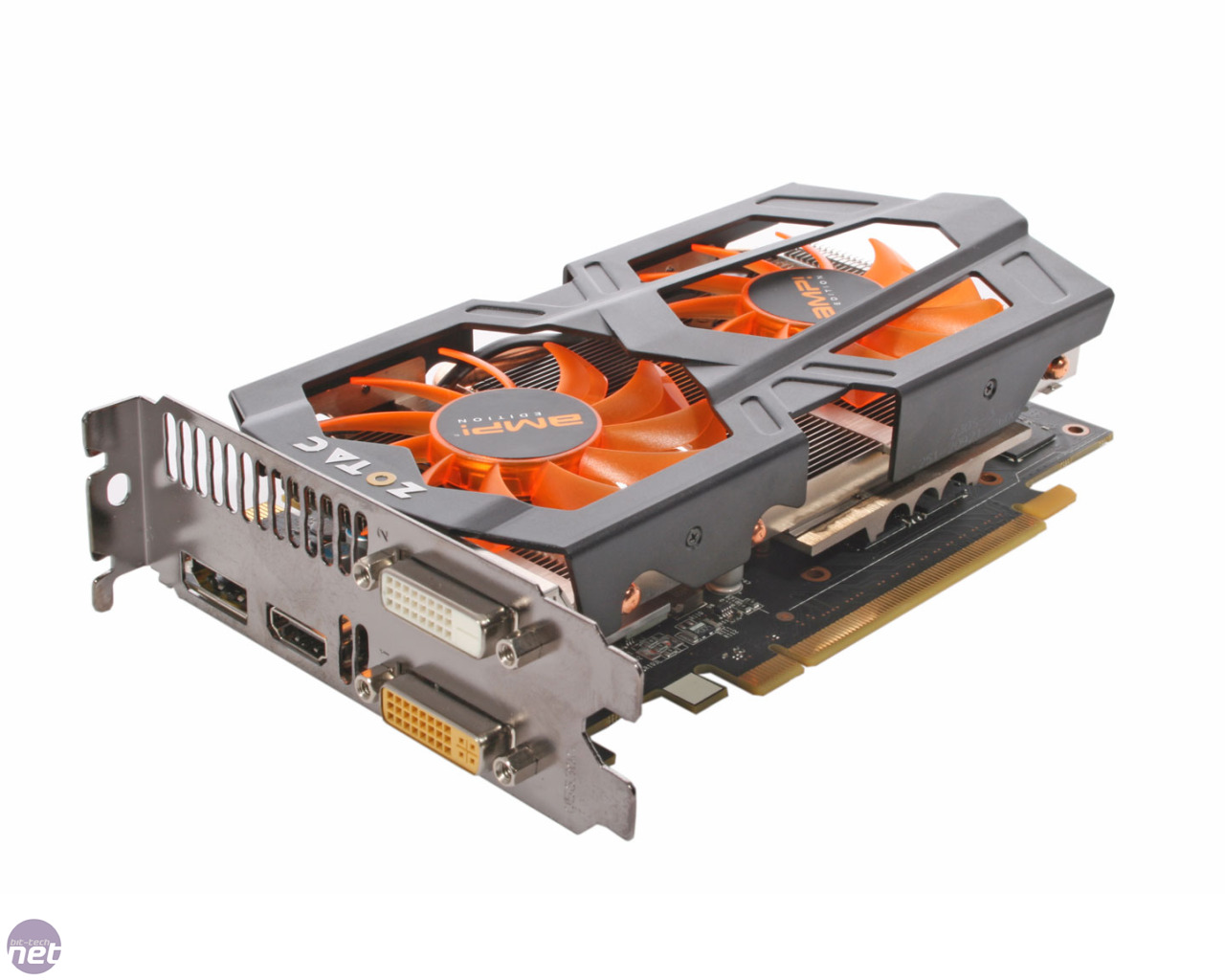
Price: Rs. 12,800 (approx)
Base clock: 993 MHz
vRAM: 2GB 192-bit
GDDR5 2-fan cooling
Maximum output (3840 x 2160)
7>Cabinet Thermaltake Versa H21

Price: Rs. 2,730 (approx)
Mid-tower 3 internal 3.5-inch drive bays 3
external 5.25-inch drive bays Upto ATX motherboard support 6.7Kg
8>SMPS Seasonic S12II 620 Watts

Price:Rs. 5,620 (approx)
Output Capacity: 620W Efficiency: >87%@
Typical Load 5 year warranty
Fan: 120mm fan bottom
9>Speakers F&D F680

Price: Rs. 2,647 (approx)
70 W Total Power
2.1 Channel Configuration
1 Year Warranty
10>Optical Drive Samsung SH-224DB/IDDS

Price: Rs. 950 (approx)
11>Mouse & Keyboard CM Storm Devastator (Bundle)

Price: Rs. 2,330 (approx)
TOTAL

Wednesday, 8 July 2015
E-commerce companies Require skills for higher salaries
NEW DELHI:Industry experts, however, rule out a mass migration from the services sector immediately -- even if e-commerce companies are emerging as bigger pay masters -- mainly because of the advanced skill-sets in demand at the new firms.
"The kind of people e-commerce (firms) are looking for are not easily available in the service-based IT sector," said Alka Dhingra, regional manager at hiring firm TeamLease Services, which conducted the study. "They are looking for people mostly from product-based companies, and are willing to pay more for people working on new technology and tools because these people are scarce resources."
Vice presidents and chief marketing officers with 18-20 years' experience at IT service companies such as Tata Consultancy Services and Infosys are paid Rs 70 lakh to Rs 1.5 crore a year, and mid-level executives such as project managers Rs 15-25 lakh a year, according to TeamLease data.
At e-commerce companies such as Snapdeal and ShopClues, the annual compensation for senior executives reaches Rs 1.5-3 crore, while midlevel employees with eight to 14 years' experience can earn Rs 50 lakh to Rs 1.5 crore a year.
 The pay scales have leaped since 2013, when senior executives at IT companies earned Rs 55-75 lakh a year and middle-level employees at e-commerce companies got Rs 35 lakh to Rs 50 lakh.
"This trend is more pronounced for coveted positions within the e-commerce companies," said a spokesperson for software industry body Nasscom. "Right now the IT companies are not very stressed on this trend because they have optimized their models."
"The kind of people e-commerce (firms) are looking for are not easily available in the service-based IT sector," said Alka Dhingra, regional manager at hiring firm TeamLease Services, which conducted the study. "They are looking for people mostly from product-based companies, and are willing to pay more for people working on new technology and tools because these people are scarce resources."
Vice presidents and chief marketing officers with 18-20 years' experience at IT service companies such as Tata Consultancy Services and Infosys are paid Rs 70 lakh to Rs 1.5 crore a year, and mid-level executives such as project managers Rs 15-25 lakh a year, according to TeamLease data.
At e-commerce companies such as Snapdeal and ShopClues, the annual compensation for senior executives reaches Rs 1.5-3 crore, while midlevel employees with eight to 14 years' experience can earn Rs 50 lakh to Rs 1.5 crore a year.
The pay scales have leaped since 2013, when senior executives at IT companies earned Rs 55-75 lakh a year and middle-level employees at e-commerce companies got Rs 35 lakh to Rs 50 lakh."This trend is more pronounced for coveted positions within the e-commerce companies," said a spokesperson for software industry body Nasscom. "Right now the IT companies are not very stressed on this trend because they have optimized their models."
"Indeed, the skill sets commanding high salaries at ecommerce companies are relatively new -- analytics, big data, data structuring, Python programming language, DevOps, Hadoop, user interface and mobility. Many of these are increasingly becoming important in the traditional IT services sector as well."
"E-commerce companies have very small core teams, and the kind of people they need are very different from the IT services companies," said Anuraag Gupta, chief executive officer of staffing company Magna Infotech. "They would not in the long run create an army of coders, testers, etc., and may eventually outsource work to the IT service sector, keeping the core technology team small."
India's digital commerce market is expected to grow 33% this year to about Rs 1 lakh crore, up from Rs 81,525 crore at the end of December, according to industry body Internet & Mobile Association of India.
IT services firms, on the other hand, have matured over the years and the industry is expected to grow at 12-14% this year, according to Nasscom.
IT services firms, on the other hand, have matured over the years and the industry is expected to grow at 12-14% this year, according to Nasscom.
Friday, 19 June 2015
How to create basic symbols with key board
How to create basic symbols with key board
Create symbols with keyboard makes your typing speed much faster than using character help. There are some basic symbols shortcut keys using "(Alt+Symbol code)" given blow image:-

Click the image for zoom
Monday, 15 June 2015
How To Backs Up All Your Windows Program & Settings
Windows: Whenever you’re doing a clean Windows installation , life is easier when you take all your settings with you. If you don’t want to do a full backup and restore of Your 'c' Drive or winodws installation drive, CloneApp backs up your Windows "programs and features " you can restore them later on .

CloneApp:-A fresh re-install always makes Windows much
faster but that means you lose all your program settings.
Clone App will Backup all your App settings from Windows
directories and the Registry and only those you really need.
CloneApp is completely portable, too, so you don’t have to
CloneApp is completely portable, too, so you don’t have to
install anything. Just extract the program to its own folder on the desktop and right-click it to launch it as an administrator. From there, check the programs you want to back up, and click Start CloneApp. It’ll back up all the necessary files and registry keys to its folder, which you can then copy to your new computer, launch the program, and click Restore to put all your settings back where on your program files or previous windows location.
you can download clone app from url: http://www.mirinsoft.com/
Thursday, 11 June 2015
5 Easy Ways To Backup Your Computer

1> Cloud Programs like Crashplan,Carbonite, & Backblaze
The most effective backup method is via cloud service, which protects your information in cyberspace. Another more traditional method is through a restore function within your computer or a hard copy backup of all your files. The reason the cloud services are more effective is that they update often without any work on your part. This type of backup is more inclusive. The likelihood of having different components backed up, such as photos, music, bookmarks, saved emails, and files is significantly higher. It simply provides the most up-to-date info accessible through an internet connection. You can also be selective of what you want to backup. For example, you could opt to never have temporary internet files backed up. This may be a good thing if your source of the crash was a virus downloaded via an internet app or email.
A major drawback to this type of backup is that cloud drives can be susceptible to hacking. The data is stored in cyberspace, where it may be at risk. This is something that needs to be researched with any cloud service. Each company has a security protocol, and it would be wise to find out if that company has ever been hacked or how it is rated among all the other cloud services out there. Like every industry, there are always good ones and then better ones.
2> Internal Backup
Most operating systems now have a “time machine” function where you can restore your computer to an earlier date. When you shut down each day, your computer saves all the programs and updates through that date. Being able to go back to a prior date might allow you to work around a suspicious file that has been downloaded that may be a virus or some other malware. This also is the simplest way to restore all your information. Internal backup systems on both Windows and Mac operating systems have become much more user-friendly over the years.
The downside of this is that other files may not be saved. Peripheral data obtained via the internet or files downloaded after the restore date may no longer be accessible. This could be very frustrating if, for instance, you collected many diverse sources for a project and then had your computer crash. Some of the research or even the breadcrumbs that may have led you to sources may not be readily apparent, and you risk having to reinvent the wheel.
3> External Hardrive
Investing in an external drive to store major files may be a good idea. This is sort of an old-school but comfortable way to have privacy and protection. This is what most people have seen IT departments use to restore computer function in the past. There are many who trust this alternative more than any other. It is user-dependent, since what is saved is what you consciously backed up. It has known parameters without external factors (relying on software or security) to protect your information.
The downfall is that if you have not backed up information recently, you might lose necessary or vital information and programs accessed since your last backup. This is the biggest problem with this sort of backup—it takes diligence to remember to backup information. It is common for people to forget to backup or save their work, and that human flaw can make your life harder if you depend on this method.
4> CD Backup
This is a more primitive method of system restore. Burning the inventory to a CD will, of course, provide you access to those files up until the date of it being burned; however, you have multiple discs to contend with as well as errors in burning that you may not have caught at the time you backed up those files. It may be unreliable to a degree. This sort of safety net allows for a great deal of issues, such as having incomplete copies of programs, glitches within the burning process, disk defectiveness, and human error. These all could be factors in making your day much more complicated.
5> Thumbdrive (Flashdrive, Pendrive)Backup
The most basic of backups of only prominent files to a thumbdrive is the most limited form of backup. Thumbdrives have relatively limited space and thus can not store much data. However, this is a very easy way to save information that came be taken anywhere at any time. You can take your entire desktop on vacation via a thumbdrive. The only drawback is the space capacity of the drive itself.
Using one or varying combinations of these sorts of backup methods will help to save you time and frustration when your computer crashes. It is better to be prepared, despite the cost of and amount of thought and energy needed to make such alternatives viable or more practical for the amount of information, the level of security, and the accessibility that you personally feel comfortable with. Each of these ways provides the basic remedy for the problem of a computer that has crashed. It comes down to personal choice, preference, and comfort. Which way works for you?
Subscribe to:
Posts
(
Atom
)
